T2125 Form Explained: The Complete Guide for Self-Employed Canadians
By
Zoombooks
Form T2125, Statement of Business or Professional Activities, is the CRA form self-employed Canadians use to report business or professional income and expenses as part of their personal T1 tax return. You can find the official Form T2125 and CRA instructions on the Canada Revenue Agency website.
If you are a sole proprietor, freelancer, independent contractor, gig worker, or another unincorporated self-employed individual, having the T2125 form explained clearly can make your tax filing much easier. Form T2125 helps you report business income, claim eligible business expenses, and calculate your net business income or loss.
This guide explains who needs to file Form T2125, what information goes into it, which expenses may be deductible, what records to keep, and how to stay organised throughout the year.
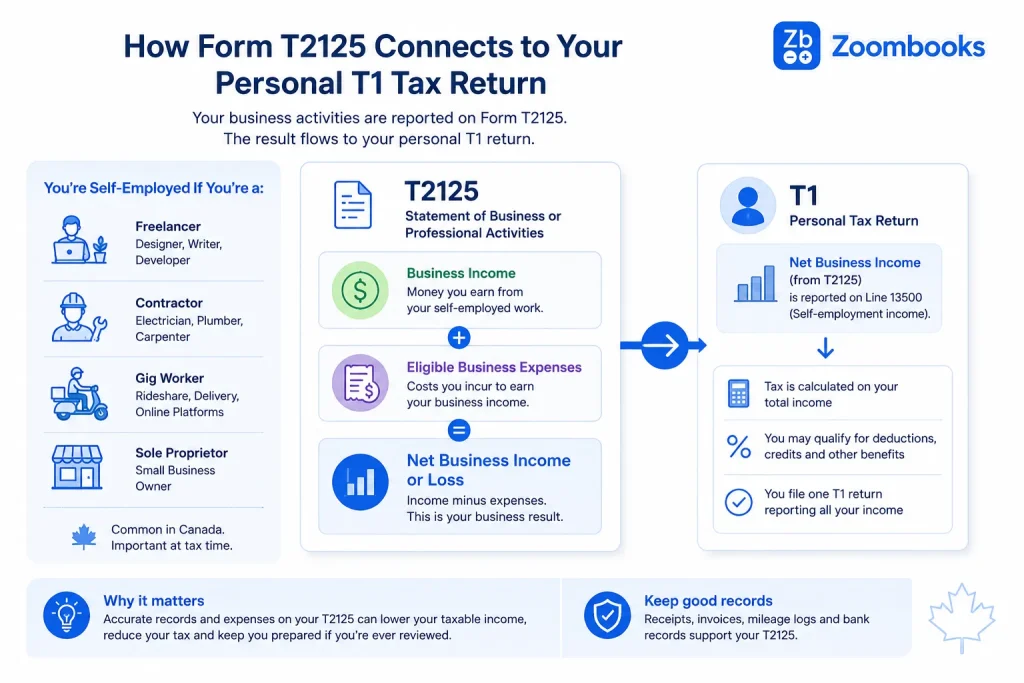
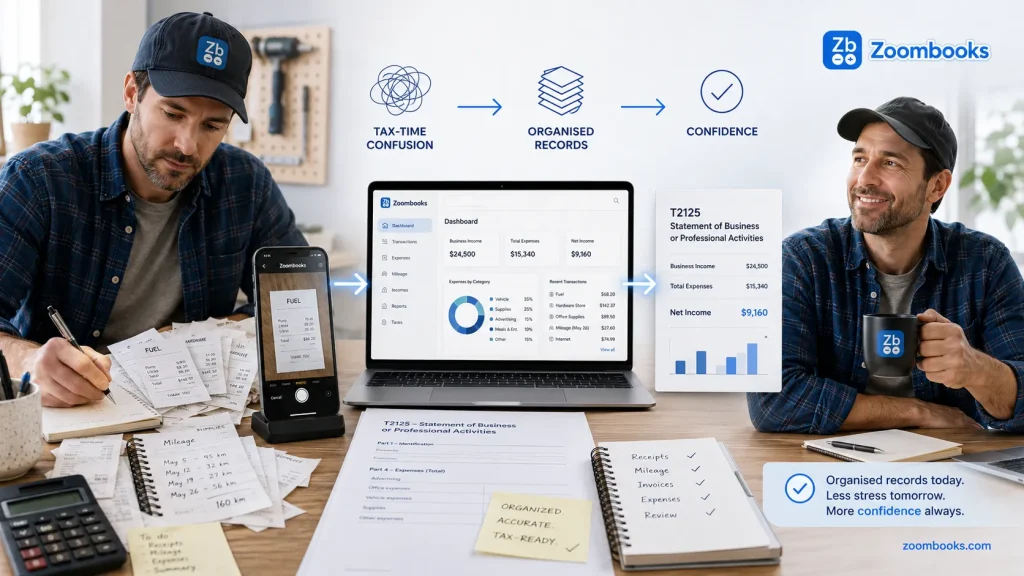
Form T2125 summarises business or professional income and expenses for your personal tax return.
Introduction
What is Form T2125, who needs to file it, and when is it due? Form T2125 (Statement of Business or Professional Activities) is the official CRA document used by unincorporated sole proprietors, freelancers, gig workers, and self-employed professionals to report their business income and claim eligible operating expenses. It acts as a detailed schedule attached directly to your personal T1 Income Tax and Benefit Return.
What is Form T2125?: Form T2125 is used to report business or professional income and expenses and calculate your net business income or loss for your T1 personal tax return.
Who needs to file it: Anyone earning unincorporated self-employment income, including independent contractors, rideshare and delivery drivers, consultants, and sole traders.
When is it due: Self-employed individuals generally have until June 15 to file their T1 return, but any balance owing is generally due by April 30.
This guide is informed by the Canadian tax and bookkeeping experience of Instaccountant and focuses on practical record-keeping habits that can make T2125 preparation easier.
T2125 Form Explained: What It Is and Who Needs to File It
When you begin researching your tax obligations as an independent earner, one term you will see throughout your tax research is Form T2125. Officially designated by the Canada Revenue Agency (CRA) as the Statement of Business or Professional Activities, this schedule serves a single primary purpose: it allows unincorporated individuals to report gross revenue, itemize allowable business expenses, and calculate net taxable profit or loss to be integrated into their personal tax return.
A frequent point of confusion for beginners is whether they need to file this document alongside a regular job or standard T4 employment income. If you earn money outside of a traditional employee-employer relationship, understanding this requirement is essential.
Who Must File a T2125?
You must complete and attach Form T2125 to your personal tax return if you operated an unincorporated business during the tax year. This requirement applies across several common self-employment categories:
Sole proprietors: Individuals who carry on an unincorporated business on their own.
Freelancers & Independent Consultants: Service providers working on a project, contract, or hourly basis for multiple clients.
Gig Workers: Drivers, delivery couriers, and task-based app workers earning income through platforms like Uber, DoorDash, or SkipTheDishes.
Unincorporated Partnerships: Individuals sharing business revenue and expenses in an unincorporated partnership structure.
Commission Earners: Workers who receive sales-based compensation without tax withheld at source by an employer.
Freelancers, contractors, gig workers and sole proprietors are common T2125 filers.
Explicit Exclusion Check: Sole Proprietorships vs. Corporations
It is important to understand the difference between an unincorporated business and a corporation. An incorporated business generally files a T2 Corporation Income Tax Return rather than using Form T2125. Form T2125 is used by individuals reporting business or professional activities on their personal tax return.
It is important to understand the difference between an unincorporated business and a corporation. An incorporated business generally files a T2 Corporation Income Tax Return rather than using Form T2125. Form T2125 is used by individuals reporting business or professional activities on their personal tax return.
This guide focuses specifically on self-employed individuals and other unincorporated business activities. If you operate through a corporation, see our guide to the T2 Corporation Income Tax Return in Canada.
The Multiple Businesses Rule
If you carry on more than one business or professional activity, you generally need to complete a separate Form T2125 for each activity. Keep the income and expenses for each activity organised so they can be reported accurately.
Keep the income and expenses for each activity organised so they can be reported accurately.
Understanding the T1 Connection: How Self-Employment Income is Taxed
Keeping your income and expenses organised throughout the year can make tax preparation much easier. See our guide to small business bookkeeping in Canada for practical record-keeping guidance.
One of the most common questions for self-employed Canadians is how business income fits into a personal tax return. Form T2125 is part of your T1 return and is used to report the income and expenses from your self-employment activity before the resulting business income or loss is reflected on your personal return.
Understanding how T2125 income flows into your T1 return also means knowing how business income, deductible expenses, and any applicable loss are reported.
The Transition from Gross Revenue to Net Taxable Income
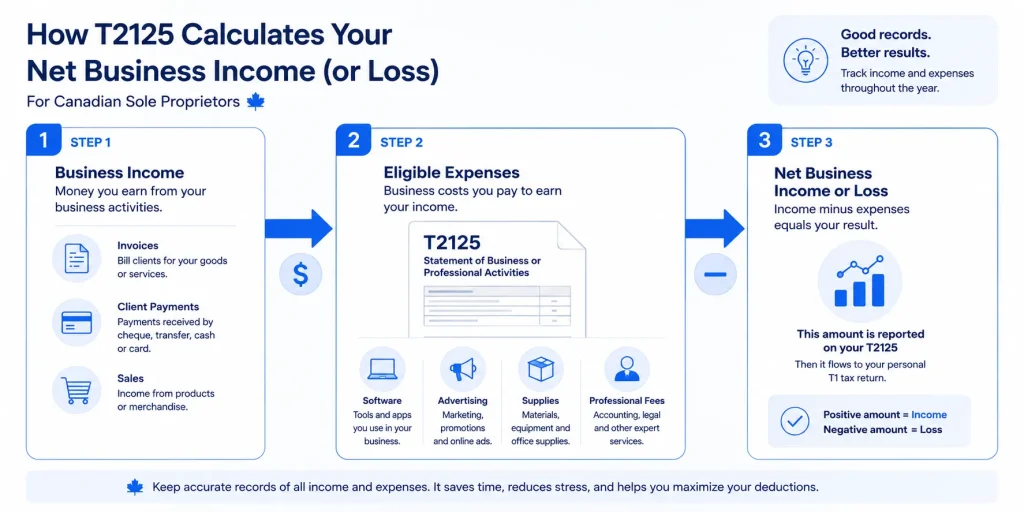
When filing taxes as a sole proprietor, you do not pay tax on every dollar that enters your business bank account. The basic calculation follows three steps:
Gross Revenue Calculation: You start by reporting all top-line income collected from client invoices, platform payouts, and direct sales in Part 3 of the T2125.
Expense Deductions: You subtract all legitimate, receipt-backed operating expenses (such as software, advertising, and supplies) itemized in Part 4.
Net Business Income Calculation: The resulting figure is your net profit or loss.This amount is used in determining the business or professional income reported on your personal tax return.
T2125 follows a simple concept: report income, account for eligible expenses, and determine your net business income or loss.
How Business Losses Offset Personal Income
One point that can be important for people with a side business is how a business loss may affect their overall personal tax return. When you launch a side hustle, initial expenses frequently outpace revenue, resulting in a net business loss on your T2125.
A business loss is reported on your personal return and may affect your other income, subject to the applicable tax rules.
Practical Example: Imagine you work a full-time job earning salary reported on a T4 while also starting a freelance business. If your eligible business expenses exceed your business income by $4,000, you may have a net business loss. A qualifying business loss may affect your personal tax return, but the tax result depends on your overall situation and the applicable CRA rules.
For information about how qualifying non-capital losses may be used on a personal return, see the CRA’s guidance on non-capital losses in other years.
Self-Employed CPP Contributions Calculated via the Return
When you are a traditional employee, your employer automatically deducts your share of Canada Pension Plan (CPP) contributions from each paycheque and matches it behind the scenes. When you are self-employed, your CPP obligations are calculated differently from an employee’s payroll deductions.
Because you are both the worker and the business owner, your T1 personal return uses the net business income calculated on your T2125 to compute your self-employed CPP contributions. Through Schedule 8 of your personal return, you are required to pay both the employee portion and the employer portion on your net self-employment earnings. Understanding how self-employed CPP contributions are calculated can help you plan for the amount that may be payable when you file your return.
Step-by-Step Breakdown of the T2125 Sections (Parts 1 to 9)
When you first open up Form T2125 (Statement of Business or Professional Activities), its multi-page layout can feel overwhelming. Many generic tax guides simply copy-paste legal definitions or list sections like a dry government manual, leaving first-time sole proprietors wondering what data actually goes where. Learning how to fill out T2125 form sole proprietor schedules successfully comes down to understanding that you only fill out the blocks that apply to your specific business model.
To make this complex structure entirely actionable, the form is divided into nine sequential parts. Here is a plain-language translation of what each section demands from you:
Part 1: Identification, SIN, Business Number, and NAICS Industry Code Selection
This opening section establishes who you are and what your business does. You will input your full legal name, your Social Insurance Number (SIN), and your business name (which can simply be your own legal name if you haven’t registered a separate trade name). If you are registered for sales tax, you will also include your 9-digit CRA Business Number.
The NAICS Code Challenge: You must select a 6-digit North American Industry Classification System (NAICS) code that best describes your primary commercial activity (e.g., code 541430 for graphic design or 492210 for local delivery couriers). Choose the industry code that most closely matches your main business activity. When filing electronically, use the industry codes provided by your tax preparation software.
Part 2: Internet Business Activities
If your enterprise generates revenue online through a website, e-commerce storefront, or digital platform, Part 2 requires you to disclose it. You must report your main business web URLs and estimate the exact percentage of gross income generated through the internet.
Part 3: Gross Income Tracking (Business vs. Professional Income)
This is where you report the money coming into your business before any deductions. You will report your income in the applicable business-income or professional-income section. Business income can include income from activities such as selling goods, providing services, trades, gig work and other commercial activities. Professional income is reported separately where the activity qualifies as professional income under the CRA rules.
Parts 4 to 6: Expenses, Net Income Before Adjustments, and Partnership Allocations
Part 4 (Business Expenses): This is the core operational ledger where you itemize your allowable overhead costs across specific CRA lines ranging from advertising and office supplies to professional fees and utilities.
Part 5 (Net Income/Loss): This calculation block subtracts your total allowable expenses from your gross revenue to determine your final net business profit or loss.
Part 6 (Partnership Allocations): This area is used exclusively if you operate an unincorporated partnership, allowing you to deduct specific expenses unique to your partnership share.
Parts 7 to 9: Additional Information and Calculations
Parts 7 to 9 cover additional information and calculations that apply depending on your situation, including business-use-of-home expenses, partnership details, and equity information.
CCA and motor-vehicle expenses should be considered separately, because the applicable calculations and reporting requirements depend on the type of property or expense involved.
Part
What it covers
Who may need it
Part 1
Identification and business or professional activity information
T2125 filers
Part 2
Internet business activities
Filers with internet-related business activity
Part 3
Business or professional income and related calculations
Business Income vs. Professional Income: Which One Are You?
Part 3 of Form T2125 separates business income from professional income, and the section you use depends on the nature of the activity you carry on. While both categories feed into your personal tax return, selecting the incorrect classification can distort your inventory reporting and violate CRA accounting compliance rules.
Understanding the contrast between business income vs. professional income ensures your NAICS codes and fiscal methods align properly with your service model.
Definition of Business Income
Business income can arise from many types of commercial activities, including selling goods, providing services, trades, freelance work, and other self-employed activities.
Definition of Professional Income
Form T2125 can be used to report both business income and professional income. The category that applies depends on the nature of the activity you carry on.
Professional income generally refers to Accountants, lawyers, doctors and other professional activities. The distinction is not simply based on whether a person holds a licence, so self-employed individuals should consider the nature of their actual activity and the CRA guidance when determining the appropriate category.
Why the Distinction Matters
The business or professional income category helps determine how the relevant income and expenses are reported on Form T2125. If you are unsure which category applies to your activity, check the CRA instructions for the form or speak with a qualified Canadian tax professional.
Feature
Business Income
Professional Income
What it covers
Commercial activities such as selling goods, trades, services and freelance work
Income from professional activities
Examples
Retailers, tradespeople, online sellers, freelance service providers
Accountants, lawyers, doctors and other professional activities
Reporting
Reported through the applicable T2125 sections
Reported through the applicable T2125 sections
Decoding the Cost of Goods Sold (COGS) Formula for Inventory & E-Commerce
For e-commerce sellers, handmade-product businesses, retailers, and other product-based businesses, the Cost of Goods Sold calculation can be one of the more confusing parts of Form T2125. The key question is simple: if you bought inventory that you did not sell during the year, should all of those purchases be treated as an expense right away?
The answer depends on how your inventory is treated for tax purposes. Understanding opening inventory, purchases and closing inventory helps you calculate the cost associated with the goods sold during the year.
Generic financial guides often skim right past this math, leaving first-time filers to guess. Getting this wrong either leaves legitimate tax deductions on the table or creates a glaring red flag for a CRA review. Master the Cost of Goods Sold T2125 formula by understanding how inventory tracking actually works.
Why You Cannot Expense All Inventory Purchases at Once
Inventory is treated separately from ordinary current business expenses. When calculating Cost of Goods Sold, you generally account for opening inventory, eligible purchases and closing inventory to determine the cost associated with the goods sold during the period.
The Exact CRA Formula for COGS
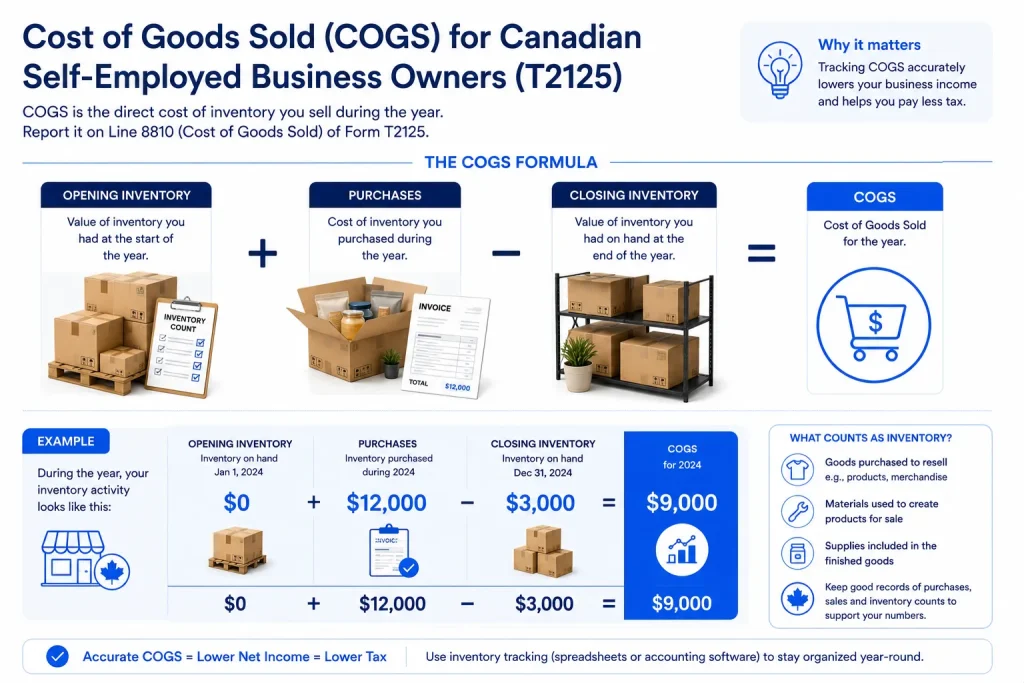
To calculate the total cost of the products you successfully sold during the fiscal period, a commonly used calculation for COGS is:
COGS connects opening inventory, purchases and closing inventory to the cost of goods sold.
Opening Inventory: The total wholesale or production value of unsold goods carried over from December 31 of the previous year.
Purchases: The direct cost of raw materials, wholesale goods, and supplies bought specifically to manufacture or stock your products during the current tax year.
Closing Inventory: The physical value of unsold stock remaining on your shelves or in your warehouse at midnight on December 31.
Practical Example for First-Year Businesses
For anyone running an e-commerce shop or product side-hustle in their very first year, the math becomes refreshingly simple because your starting baseline is zero.
Worked Example:
Imagine you launched an independent online store this year.
Opening Inventory: $0 (Since it is your first year in business).
Total Purchases: You spent $12,000 wholesale buying inventory throughout the year.
Closing Inventory: At year-end, you do a physical stock count and realize you still have $3,000 worth of unsold products sitting in boxes.
Based on this example, the Cost of Goods Sold is $9,000. The remaining $3,000 of inventory is reflected in closing inventory rather than included in the current year’s COGS calculation. That $9,000 reduces your gross business income, while the remaining $3,000 rolls over to become next year’s opening inventory.
Eligible T2125 Expense Categories & Deductions (Line by Line)
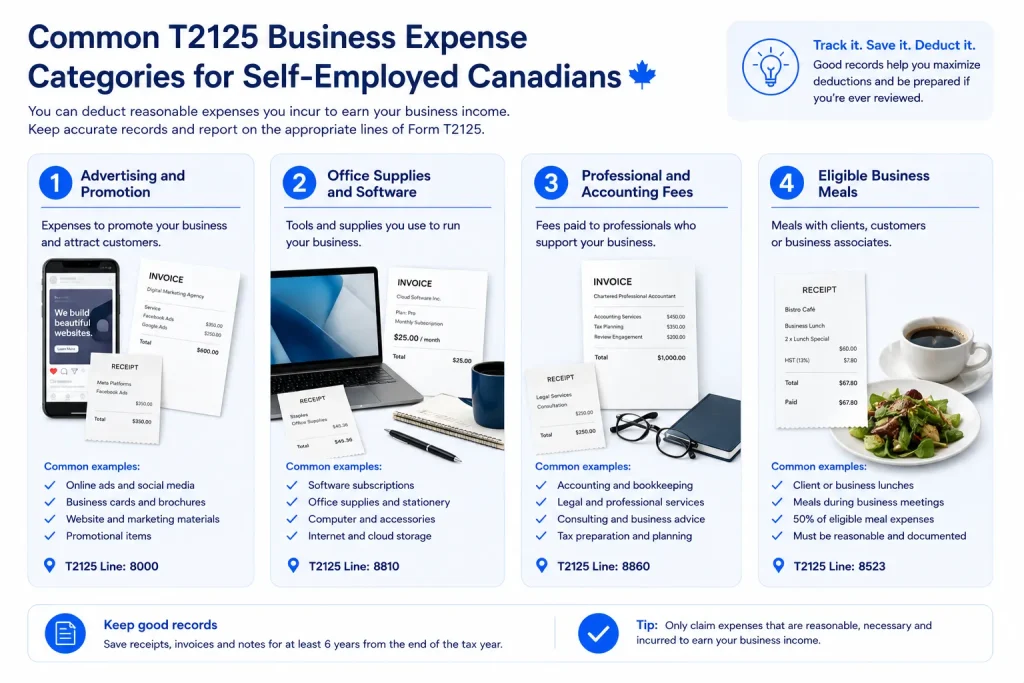
Eligible business expenses may reduce the business income reported for tax purposes, subject to the CRA rules that apply to the expense. Keeping clear receipts, invoices and other supporting records can help substantiate the expenses you claim.
Core Deductible Expense Categories and Line References
To help you map your spending accurately, here are the primary expense lines itemized on Part 4 of the T2125:
The CRA provides detailed guidance on what may qualify as a business expense and how expenses are reported on Form T2125. See the CRA’s business expense guidance for Form T2125 for the current rules.
Advertising and Promotion (Line 8521): Covers costs incurred to market your business, attract clients, or build brand awareness. This includes digital ads (such as Meta or Google ads), business card printing, domain registrations, website hosting fees, and promotional merchandise.
Office Supplies, Software, and Subscriptions (Line 8810): Everyday administrative items required to keep your office running, including printer paper, pens, ink cartridges, notebooks, and digital cloud software subscriptions (e.g., project management tools or design suites).
Professional, Legal, and Accounting Fees (Line 8860): Money paid to certified professionals for services directly related to your business operations such as hiring a CPA to file your taxes, legal fees for reviewing client contracts, or payments made to business consultants.
Meals and Entertainment (Line 8523): Expenses incurred when taking a prospective client out for dinner, buying coffee during a business meeting, or purchasing food while traveling for work.
Keeping expenses organised by category makes T2125 preparation easier.
The 50% Rule for Meals (Line 8523): Eligible business meals and entertainment expenses are generally subject to a 50% deduction limit under Subsection 67.1(1) of the Income Tax Act, although certain exceptions may apply under CRA rules. Keep the full amount of the expense in your records, but generally only 50% of the eligible amount can be claimed as a business expense on Form T2125.
What Cannot Be Claimed (Non-Deductible Items)
A common concern for self-employed individuals is accidentally treating a personal expense as a business expense.
These are examples of expenses that generally should not be claimed as business expenses:
Personal Living Expenses: Groceries, family dinners, personal clothing, and household utilities are entirely personal and cannot be written off.
Parking Fines and Traffic Tickets: Speeding tickets, parking infractions, and municipal fines incurred while driving for work are strictly non-deductible penalties.
Standard Daily Commuting: Driving from your personal residence to a regular, fixed place of business is considered personal travel, not a deductible business expense.
Expense category
What it can include
T2125 line
Advertising and promotion
Online ads, business cards and other promotional costs
8521
Meals and entertainment
Eligible business meals and entertainment, subject to applicable limits
8523
Office expenses
Office supplies and other eligible office costs
8810
Professional fees
Eligible accounting, legal and professional services
8860
Motor vehicle expenses
Eligible business-use vehicle expenses
9281
Keep the supporting receipts, invoices and other records for the expenses you claim, and check the current CRA instructions for the rules that apply to each category.
Complex Deductions Made Simple: Vehicle, Home Office and CCA
When filing Form T2125, Three areas that often require extra attention are motor vehicle expenses, business-use-of-home expenses, and Capital Cost Allowance (CCA). Each has specific calculation and record-keeping requirements.
Demystifying these complex sections comes down to applying clear step-by-step calculations and maintaining strict compliance standards.
Motor Vehicle Expenses: Business Kilometres and Record Keeping
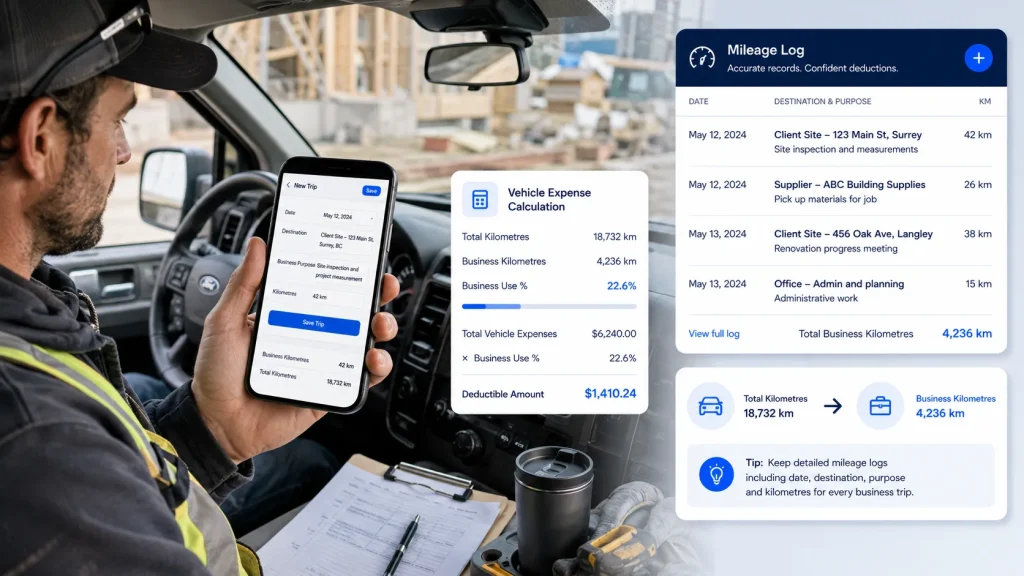
For tradespeople, mobile consultants, and independent contractors, vehicle deductions represent substantial tax savings. A reliable mileage record is important because your vehicle deduction is based on the business-use portion of your eligible vehicle expenses.
Keep records that support the kilometres you drove for business purposes and the total kilometres driven during the year.
To claim motor vehicle expenses on Line 9281, you must track all actual operating costs including fuel, maintenance, insurance, and registration and multiply that total by your verified business-use ratio:
$$\text{Allowable Vehicle Deduction} = \text{Total Operating Costs} \times \left( \frac{\text{Total Business Kilometres Driven}}{\text{Total Kilometres Driven in Fiscal Year}} \right)$$
Your vehicle deduction depends on the business-use portion of your eligible vehicle expenses and accurate mileage records.
Strict Logbook Requirements: Under CRA guidelines, a valid logbook must record CRA’s vehicle record-keeping guidance outlines the information you should keep to support business travel, including the date, destination, purpose and kilometres driven. You must also photograph or record your vehicle’s total odometer reading on January 1 and December 31.
Business-Use-of-Home: Square Footage Calculations
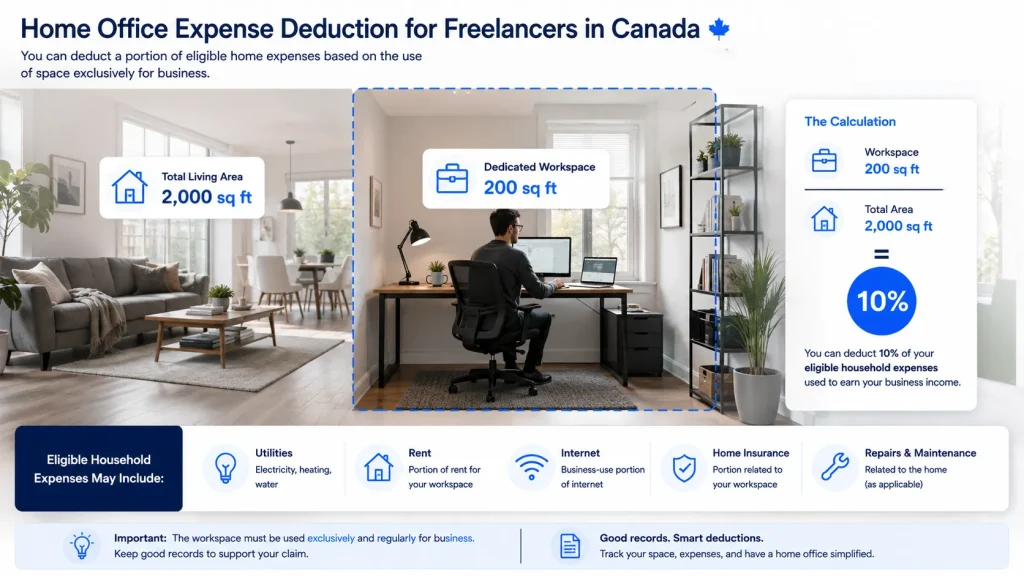
If your home serves as your principal place of business or is used exclusively on a regular and ongoing basis to meet clients, you can claim a prorated share of your household upkeep.
Calculating your workspace deduction requires a clean step-by-step mathematical proration:
Determine Workspace Area: Measure the total square footage of your dedicated home office space (e.g., 200 sq. ft.). For the current rules and calculation requirements, see the CRA’s business-use-of-home expense guidance.
Determine Total Home Area: Measure the total finished square footage of your entire residence (e.g., 2,000 sq. ft.).
Calculate the Ratio: Divide your workspace area by the total area:$$\frac{200 \text{ sq. ft.}}{2,000 \text{ sq. ft.}} = 10\%$$
Apply to Eligible Expenses: Apply the appropriate business-use percentage to eligible household expenses under the CRA’s business-use-of-home rules. The expenses you can claim and the amount you can deduct depend on your workspace and how it is used.
Home-office expenses may be prorated based on eligible business use and the CRA’s applicable rules.
Capital Cost Allowance (CCA): How It Works
If you buy qualifying property for your self-employed business, you may not be able to deduct the full purchase cost as a current expense. Instead, the cost may be deducted over time through Capital Cost Allowance (CCA).
The CRA groups depreciable property into different classes, and the applicable CCA rate depends on the type of property. Vehicles, computers, equipment and other assets can have different classifications and special rules.
Real-World Messy Scenarios: Mixing Accounts, Cash Reimbursements and Net Losses
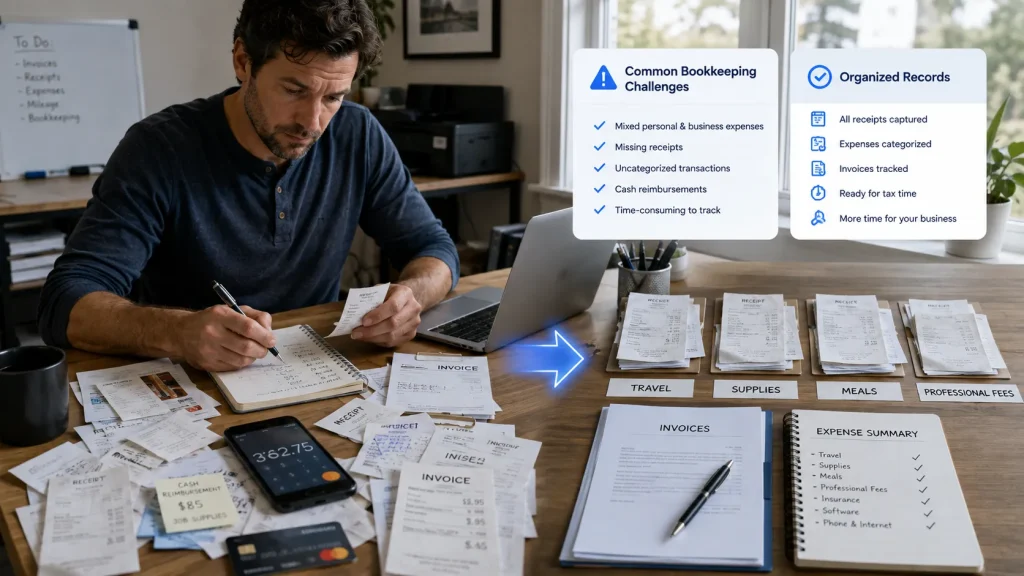
Real-world self-employment rarely looks as tidy as a bookkeeping textbook.
Self-employed bookkeeping rarely stays perfectly organised when work gets busy.
A receipt may be paid with a personal card, a family member may make a purchase on your behalf, or you may reach tax time with incomplete records. Here are some common situations and how to approach them.
Scenario A: Can I use my personal bank account or credit card for business expenses?
What to Know: Using a personal bank account or credit card does not automatically make a business expense non-deductible. The important issue is whether the expense was incurred to earn business income and whether you have adequate records to support the claim.
A separate account can make bookkeeping much easier because it reduces the work required to identify and separate business transactions from personal spending.
Scenario B: What is the rule if a family member paid for a service tool on their card and I reimbursed them in cash?
The Direct Solution: The fact that another person paid the vendor does not by itself determine whether the expense is deductible. What matters is whether the expense relates to earning your business income and whether you can properly substantiate it.
Keep the original invoice or receipt and retain a clear record of the reimbursement.
Scenario C: What happens if my expenses exceeded my income (net loss) in my first year?
The Direct Solution: A first-year business can report a net loss when deductible business expenses exceed business income. What happens to that loss depends on the type of loss and the applicable CRA rules.
A business loss is reported on your personal return and may affect other income, subject to the applicable tax rules. Certain non-capital losses may be carried back or forward where CRA rules allow.
T2125 Filing Deadlines and CRA Record-Keeping Requirements
For the 2025 tax year, the self-employed filing deadline was June 15, 2026, while balances owing were due April 30, 2026. Filing and payment dates can change by tax year, so check the current CRA dates when preparing a future return.
Essential Timeline Breakdown: Filing vs. Payment Deadlines
June 15 Filing Deadline: Self-employed individuals and their spouses or common-law partners have until June 15 to submit their personal T1 tax return containing Form T2125. (Note: If June 15 falls on a weekend, the deadline moves to the next business day).
April 30 Payment Deadline: Self-employed individuals generally need to pay any balance owing by April 30, even though their T1 return generally has a June 15 filing deadline. Interest may apply to unpaid amounts after the payment deadline, and a late-filing penalty may apply when a return is filed late.
Tax Instalments: You may have to make instalment payments if your net tax owing meets the CRA’s applicable threshold and conditions. Instalment due dates in 2026 are March 15, June 15, September 15 and December 15.
Tax instalments are a separate personal tax obligation. They may apply when your estimated net tax owing meets the CRA’s applicable threshold and conditions.
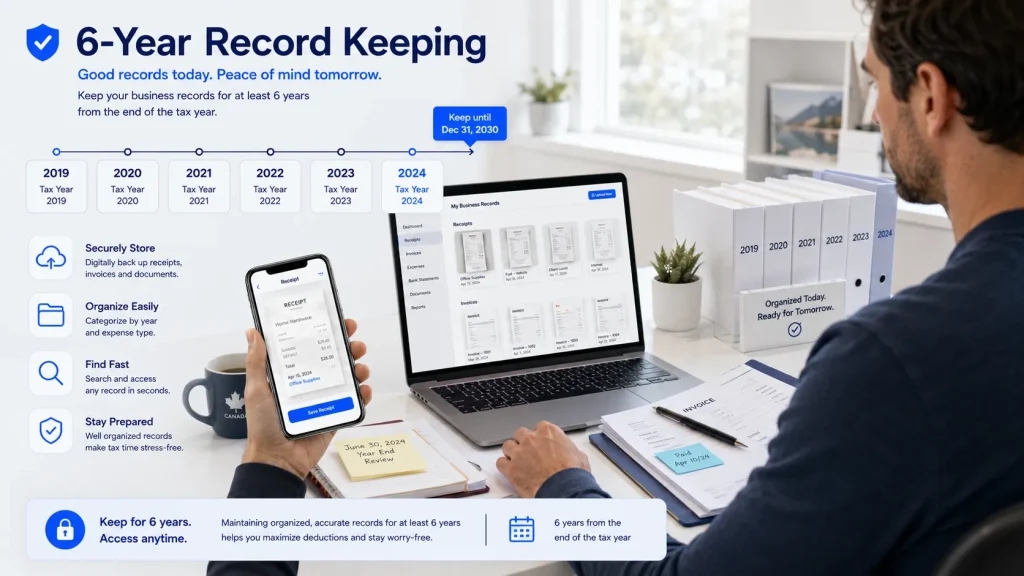
Keep supporting business records organised and accessible throughout the required retention period.
The CRA 6-Year Record Retention Rule
Under Subsection 230(4) of the Income Tax Act, you are legally obligated to maintain all books, invoices, contracts, and supporting documents for a minimum of six years from the end of the last tax year to which they relate.
Why Bank Statements May Not Be Enough: A bank or credit-card statement can help document a transaction, but it may not show enough detail about what was purchased or why it was a business expense. Keep the underlying receipt or invoice whenever possible.
Keeping Digital Copies of Your Records: CRA accepts electronic records when they meet the applicable record-keeping and accessibility requirements. Digital copies can be a practical way to keep receipts and supporting documents organised, but electronic storage is not the only permitted record format.
How Zoombooks Helps Self-Employed Canadians Stay Organised for T2125
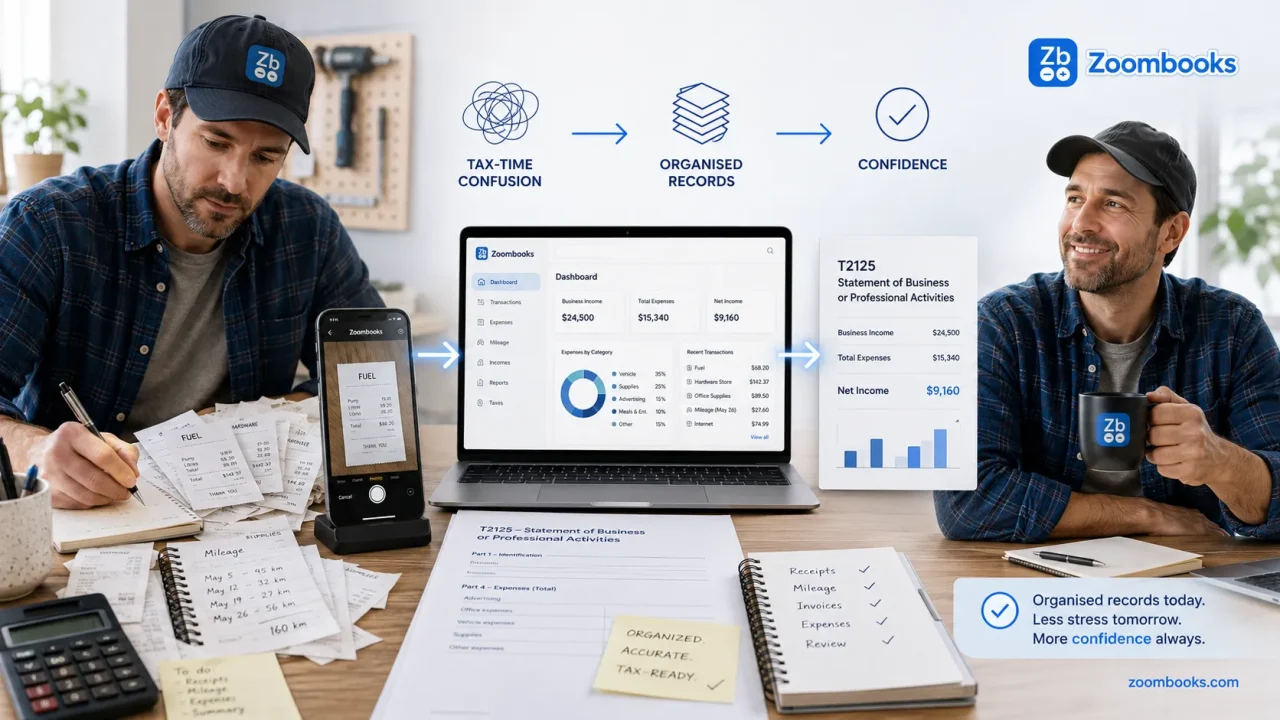
Keeping self-employed income, expenses, receipts and other supporting records organised throughout the year can make T2125 preparation much easier.
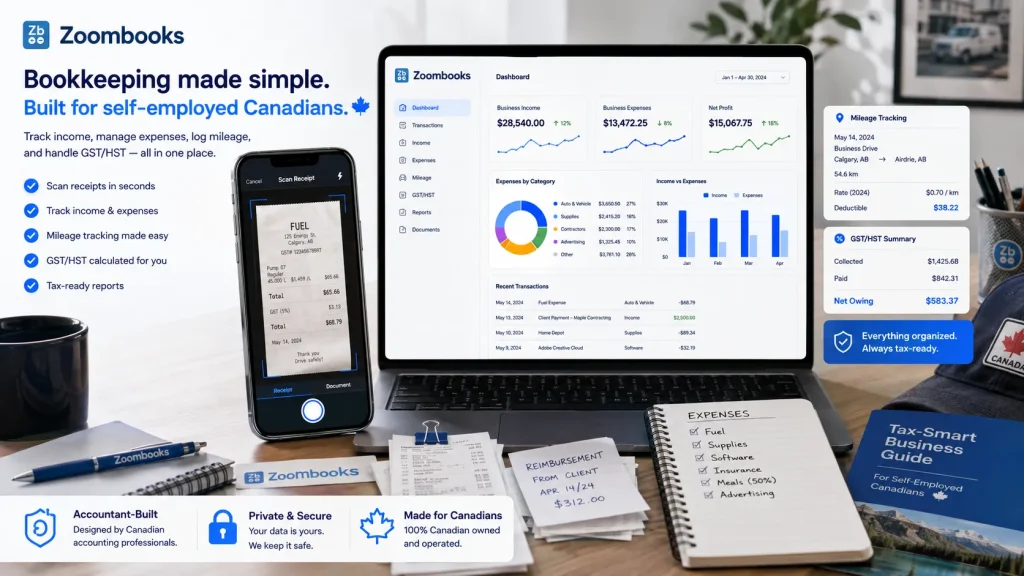
Capture expenses as you work so your T2125 records are easier to organise at tax time.
Many self-employed people start with spreadsheets, paper receipts or a mix of notes and bank statements. The challenge is keeping those records organised consistently as work gets busy.
Reconstructing twelve months of financial history over a single weekend in April leads to high stress, lost deductions, and expensive bookkeeper bills. What sole proprietors need is a lightweight tool built specifically to handle Canadian tax workflows without enterprise software bloat.
Why Spreadsheets and Shoeboxes Fail
Manual spreadsheets require you to open a laptop, find the correct tab, and type out vendor names, dates, amounts, and tax breakdowns for every purchase. Manual entry adds friction, which can make consistent record-keeping harder when you’re busy with client work or jobs. Furthermore, thermal paper receipts fade quickly in vehicle consoles, erasing your proof of purchase before tax season even arrives.
The Zoombooks Advantage: Built for Solo Workflows
Developed by the Canadian tax accountants at Instaccountant, Zoombooks is a specialized business expense tracking app for T2125 schedules designed to reduce the amount of end-of-year bookkeeping and record reconstruction required.
Receipt Scanning: Capture receipts from your phone and organise transaction details without having to type every field manually.
Automated GST/HST & ITC Tracking: Seamlessly separates the base cost from sales tax paid, GST/HST tracking: Zoombooks helps separate tax amounts on recorded expenses and track GST/HST-related information alongside your bookkeeping records.
Mileage tracking for business travel: Zoombooks helps you keep the trip details needed to organise business mileage records.
Transparent, Accessible Pricing: Zoombooks is built around a simple bookkeeping workflow for self-employed Canadians, with plans starting free and paid options available for higher receipt-scanning needs.
You can also view Zoombooks pricing to compare the available receipt-scanning plans.
Receipt scanning: Capture receipts from your phone and organise transaction details without having to type every field manually.
GST/HST & ITC tracking: Zoombooks helps separate tax amounts on recorded expenses and track GST/HST-related information alongside your bookkeeping records.
Mileage tracking for business travel: Zoombooks helps you keep the trip details needed to organise business mileage records.
Accountant-Built for Canada
Make Your T2125 Records Easier to Manage
Start with Zoombooks and keep your self-employed income, expenses, receipts and other records organised throughout the year.
T2125 Filing Checklist for Self-Employed Canadians
Before filing your T2125, make sure you have:
Business income records
Expense receipts and invoices
Vehicle mileage records, if applicable
Home-office records, if applicable
Inventory information, if applicable
CCA information, if applicable
GST/HST records, if registered
Separate records for each business activity
WORKED EXAMPLE
How a Self-Employed Consultant’s T2125 Numbers Come Together
Here’s a simple example of how business income and eligible expenses can
come together to determine net business income.
Business Income
Business income$60,000
Eligible Business Expenses
Software$1,500
Advertising$2,000
Professional fees$1,000
Business-use phone/internet$900
Other eligible expenses$1,600
Total expenses$7,000
NET BUSINESS INCOME
$53,000
Business income$60,000
−
Total expenses$7,000
=
Net business income$53,000
i
This $53,000 represents the example’s net business
income before considering any other applicable tax adjustments or
deductions on the individual’s personal tax return.
Frequently Asked Questions About Form T2125
Do I need to file a T2125 if my side hustle made no money or operated at a loss?
It depends on whether you were carrying on a business during the year. Having no revenue does not by itself answer the question. If you had business activity and expenses but no income, review the CRA guidance for your circumstances before reporting a loss.
Can I file a T2125 without a business number or registered business name?
A sole proprietor does not automatically need a separate business number simply because they are self-employed. Business-number requirements depend on the CRA program accounts and registrations that apply to your situation, such as GST/HST.
What should I do if I made a mistake on my T2125?
If you discover an error after filing, you may be able to correct your return through the CRA’s available adjustment process. The appropriate process depends on the type of correction and the tax year involved.
How long do I actually need to keep my physical or digital receipts?
CRA’s record-keeping rules generally require supporting records to be retained for six years from the end of the last tax year to which they relate, although specific situations can have different requirements. Keep your receipts, invoices, mileage records and other supporting documents in an accessible format.
Can I claim home office expenses if I work from home part-time?
You may be able to claim eligible business-use-of-home expenses when the CRA’s conditions are met. The calculation depends on how your workspace is used and the applicable business-use-of-home rules. See the CRA guidance for the specific requirements that apply to your situation.
Is it mandatory to fill out the Cost of Goods Sold (COGS) section for e-commerce?
If you sell goods and have inventory, COGS may apply. The calculation generally considers opening inventory, purchases and closing inventory. The exact treatment depends on the nature of your business and the applicable CRA rules.
Can I claim 100% of my restaurant meals and client coffees on the T2125?
No. Eligible business meals and entertainment expenses are generally subject to a 50% deduction limit under Subsection 67.1(1) of the Income Tax Act, although certain exceptions may apply under CRA rules. Keep the full amount of the expense in your records, but generally only 50% of the eligible amount can be claimed as a business expense on Form T2125.
What is the difference between the June 15 filing date and the April 30 payment date?
For the 2025 tax year, self-employed individuals generally had until June 15, 2026 to file their T1 return, including Form T2125, while any balance owing was generally due by April 30, 2026. Filing and payment dates can change by tax year, so check the latest CRA deadlines for the tax year you are filing.
Can I use my personal bank account or credit card for business expenses?
Using a personal bank account or credit card does not automatically make a business expense non-deductible. What matters is whether the expense was incurred to earn business income and whether you have adequate records to support the claim. A separate account can make it easier to keep business and personal transactions organised.
Sources & Further Reading
For the official rules and current filing guidance, see:
Muhammad Muzammil combines technical WordPress development,
SEO strategy, and content architecture to turn complex
small-business topics into practical, easy-to-follow guides.
His work focuses on making information clearer, more useful,
and easier to act on.
Based in Toronto, Ontario, Murtaza Bhatti brings extensive
experience in accounting, audit, ERP implementation, and
Canadian business tax workflows. Through
Instaccountant and Zoombooks,
he focuses on practical bookkeeping and record-keeping solutions
for Canadian self-employed professionals and contractors.
Why this matters:
Keeping your self-employed income, expenses, receipts, mileage,
and other supporting records organised throughout the year can
make T2125 preparation much easier.
i
Editorial note: This guide provides general information about Form T2125 for Canadian self-employed individuals. It is not personalised tax, legal, or accounting advice. Tax treatment can vary depending on your circumstances, business activity, and the tax year involved. Always check the latest CRA guidance before filing.
Powered by the Zoombooks & Instaccountant ecosystem
Zoombooks is a Canadian bookkeeping and receipt-scanning app developed by accountants to help freelancers and contractors automate expenses, track GST/HST ITCs, and stay 100% CRA audit-proof.